Network Traffic Monitor for Mac
Your network,
right in your menu bar.
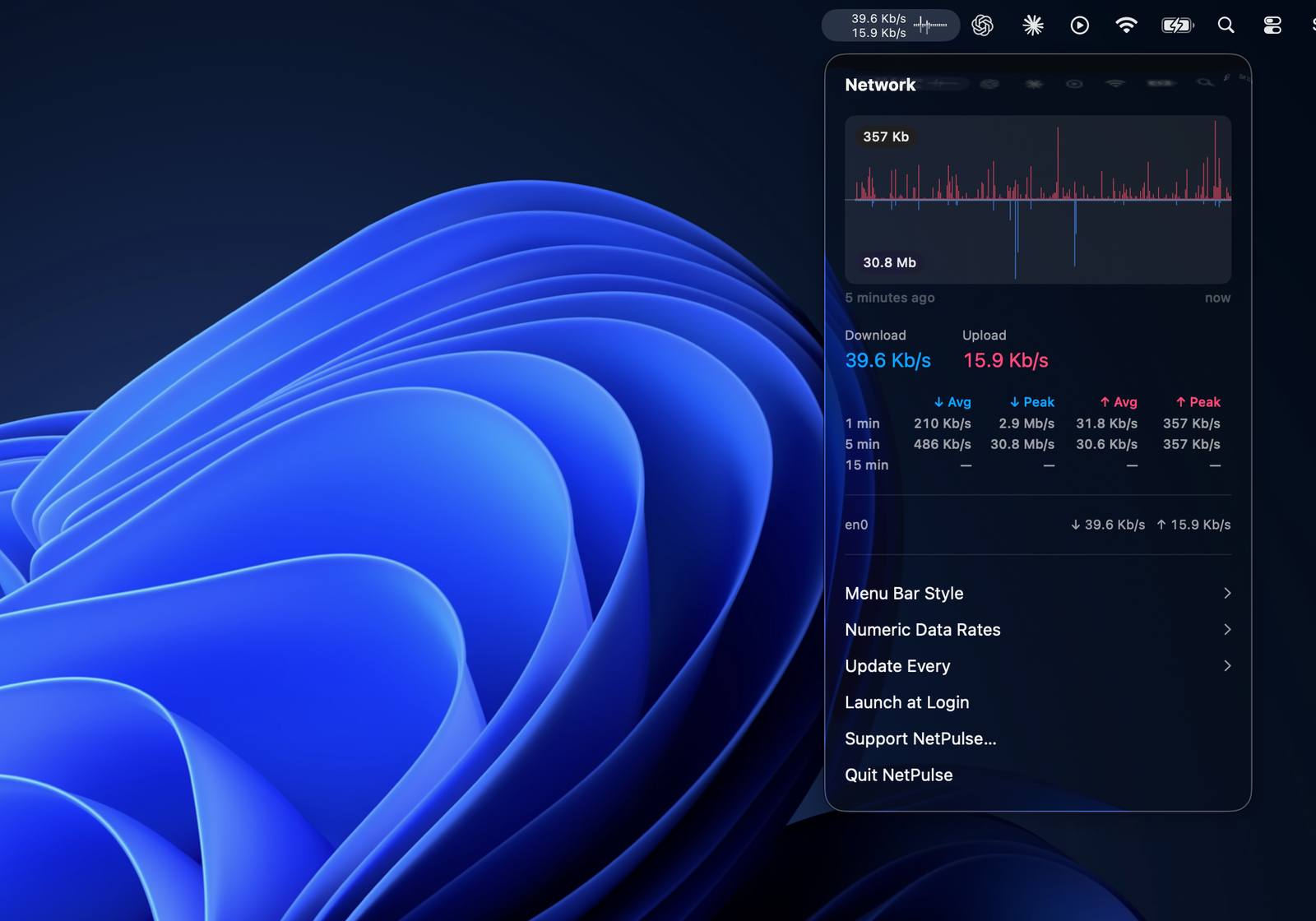
Live download and upload speed, a per-interface breakdown, and a compact history graph — always one click away, never in your way.
Network Traffic Monitor for Mac
Live download and upload speed, a per-interface breakdown, and a compact history graph — always one click away, never in your way.
What It Does
Four things Network Traffic Monitor does well, and nothing it doesn't need to.
No Dock icon, no window to manage. Network Traffic Monitor samples your network throughput once a second and stays quietly out of the way.
See Wi-Fi, Ethernet, and VPN traffic broken out separately in the popover, alongside a compact chart of recent activity.
Choose how the menu bar itself displays your speed — numeric rates, a small graph, or both at once — right from Settings.
Switch between bytes and bits per second, and turn on Launch at Login so Network Traffic Monitor is already running when you need it.
Network Traffic Monitor reads the byte counters macOS already maintains for each network interface — it never inspects packet contents, never sees which apps or sites you're using, and needs no special privacy permission or administrator access. It runs inside the standard App Sandbox, and nothing it reads ever leaves your Mac.